DevWebUI starts, stops and restarts your projects' dev servers — with live status, CPU, memory and logs. Click to run them yourself, or let your AI agents drive the same daemon over MCP.
.devwebuiList your repo's dev servers in one small file.
Every process, grouped by project, with live status.
Start, stop, restart. Your AI does the same over MCP.
Start, stop, restart any dev server. Live status, CPU, memory and logs — no shell required.
17 tools let AI agents drive the same daemon you click. Humans and agents, one source of truth.
Drop a .devwebui file — every process groups under one panel, remembered on restart.
Detects clashes, names the process holding the port, and frees it in one click.
A persisted, de-duplicated error log survives restarts and crashes — and agents can read it too.
A Windows tray app boots the daemon hidden — no console window. Open, rebuild, restart, quit.
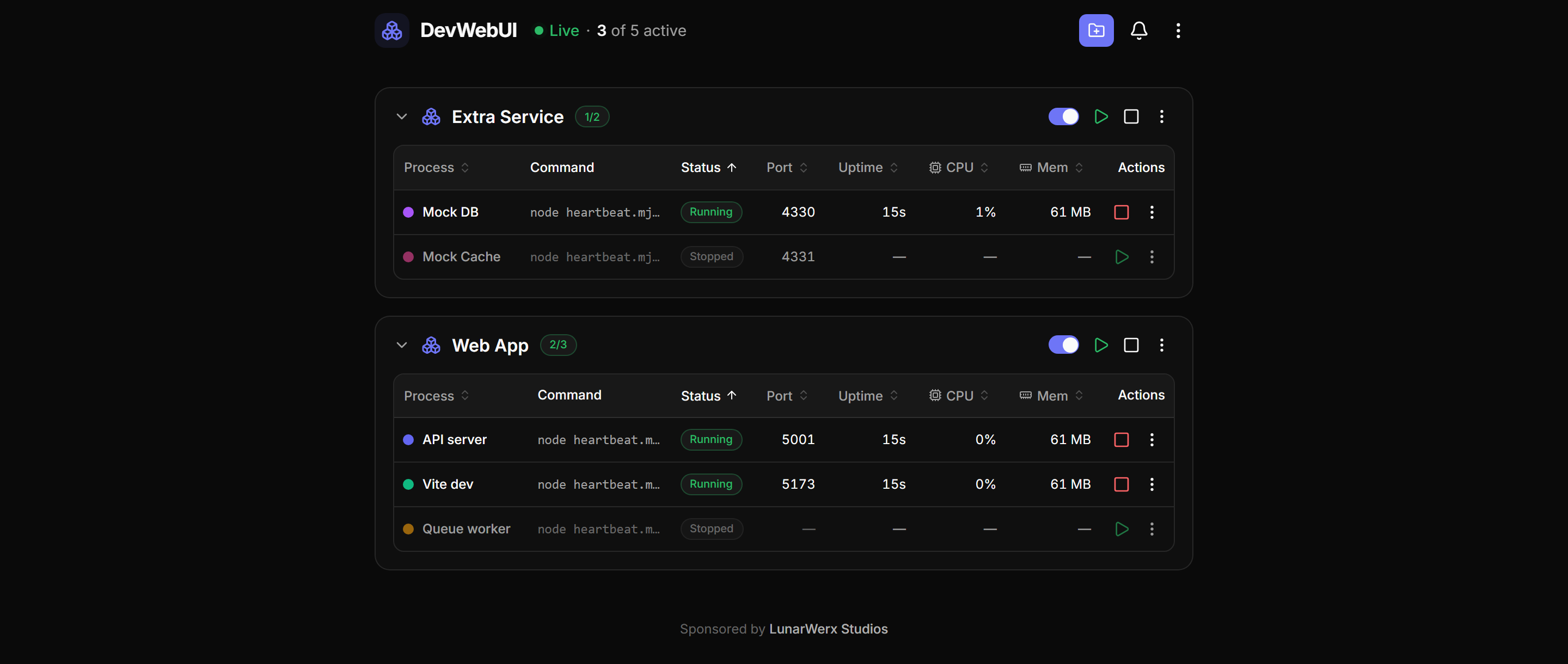
Click to run your servers. Watch status, CPU, memory and logs in one pane — no terminal juggling.
17 tools drive the exact same daemon. Humans and AI share one state — zero drift, nothing to sync.
Runs entirely on your machine. No accounts, no cloud, nothing to sign up for — just a daemon on your localhost. Open source under MIT. On the roadmap: macOS / Linux tray, in-GUI env editor, log search and multi-host.
bun run devDrop a .devwebui file in your repo, open the pane, and hand the same controls to your agents.